Appomatox Calculator Help
Appomatox Calculator is available in a browser and as a terminal CLI (Windows cmd/PowerShell and Linux/macOS bash/zsh).
Run In Browser
Open index.html directly in your browser.
The app automatically uses a file:// compatible standalone bundle when opened from disk.
Run In Terminal
One-shot expression
Pass an expression to any CLI launcher:
node cli.js "2+3*4"
# Linux/macOS
./appoc.sh "2+3*4"
# Windows Command Prompt
appoc.cmd "2+3*4"
# Windows PowerShell
.\appoc.cmd "2+3*4"
# macOS terminal
./Appomatox\ CLI.command "2+3*4"
Expected output:
14Interactive mode
Start any launcher without an expression:
node cli.js
./appoc.sh
appoc.cmd
.\appoc.cmd
./Appomatox\ CLI.command
Interactive commands:
:helpShow available commands and functions:clearClear history:edit LIST,:edit SERIES,:edit SET,:edit TIME, or:edit TRIANGLEOpen an editor; pass a value or variable name to prefill it:execute_file filenameDisplay a UTF-8 file and execute it after confirmation (CLI only):save_last result.txtor:save_last diagram.svgSave the most recent result (CLI only):export_history history.mdExport the history and diagram SVGs as Markdown assets (CLI only):chart output text|chafaRender CLI diagrams as terminal text or via Chafa (CLI only):historyShow previous calculations:angle [deg|rad]Switch trigonometric angle mode:locale [auto|us|de]Switch number separators:mode [dec|hex|bin]Switch result output mode:versionShow current app version:quit/:q/exitLeave interactive mode
History navigation keys (interactive input):
ArrowUp/ArrowDown: browse previous/next history entry and recall the originalexpressionShift+ArrowUp/Shift+ArrowDown: browse previous/next history entry and recall theresult
File names without whitespace may be entered directly; names with whitespace require single quotes, for example :execute_file 'my commands.md'. :execute_file previews the file, then runs every non-empty, non-comment line after confirmation. For Markdown files, only fenced blocks marked appo are executed. :export_history writes that same reusable appo-block format and places diagram SVG files in a sibling -assets directory.
Function And Command Completion
Function and command suggestions are generated automatically from the registered definitions.
- Type at least two letters of a function name, or start a command with
:. - Press
Tabto accept the selected suggestion. - In the browser, use
ArrowUp/ArrowDownwhile suggestions are open,Enterafter navigating to accept, orEscapeto close the list. - Functions with arguments place the cursor inside the inserted parentheses.
- The interactive terminal uses the same catalog for
Tabcompletion.
Expression Rules
Allowed characters:
- digits
+ - * / % ^- parentheses
(and) - spaces
- decimal point
.
Result display uses your system's default locale formatting with thousand separators. Example in German locale: 1234 is shown as 1.234.
Input also accepts thousand separators using your default locale format.
Invalid characters are rejected.
Functions
Functions use semicolons (;) to separate arguments, which avoids ambiguity with the locale decimal separator.
Syntax: FUNCTION_NAME(arg1; arg2; ...)
Basic mathematics
MIN and MAX
Return the smallest or largest value. Each function accepts either two numeric arguments or one non-empty, one-dimensional numeric list.
MIN(5;3)->3MAX(5;3)->5MIN([3;-2;5;1])->-2MAX([3;-2;5;1])->5MIN([FRAC(1;2);FRAC(1;3);FRAC(3;4)])->FRAC(1;3)MAX([FRAC(1;2);FRAC(1;3);FRAC(3;4)])->FRAC(3;4)
MIN([]) and MAX([]) are undefined and produce an error. The two-argument form can also be used inside FORMULA expressions.
Function names are case-insensitive.
ROUND
Rounds a value to the given number of decimal places.
ROUND(value)— rounds to integer (0 decimal places)ROUND(value; digits)— rounds todigitsdecimal places
Examples:
ROUND(1/3; 2)→0.33ROUND(1.5)→2ROUND(2/3; 2)→0.67
SQRT
Returns the square root of a value.
SQRT(value)
Examples:
SQRT(4)->2SQRT(1+8)->3SQRT(2)^2->2
SUM and PRODUCT
Evaluate an expression or a FORMULA value for every integer in an inclusive range.
SUM(expression or FORMULA; start; end)adds the resulting termsPRODUCT(expression or FORMULA; start; end)multiplies the resulting termsstartandendmust be integers- up to 100,000 terms are supported
Examples:
SUM(X;1;5)->15SUM(X^2;1;5)->55SUM(FORMULA('N'; 'N^2');1;5)->55PRODUCT(X;1;5)->120PRODUCT(X+1;1;3)->24SUM(FRAC(1;X);1;3)->FRAC(11;6)
X is local to the function and does not overwrite a stored variable with the same name. An *expression* is entered directly and usually uses X, such as X^2. A *FORMULA* is a value created beforehand with FORMULA('N'; 'N^2'); its declared parameter is substituted for each term. An empty range returns 0 for SUM and 1 for PRODUCT.
Number format conversions
ROMAN
Converts an integer from 1 through 3999 to conventional Roman numerals, or a Roman numeral back to an integer. Roman numeral input must use conventional subtractive notation.
ROMAN(value)
Examples:
ROMAN(1978)->MCMLXXVIIIROMAN('MCMLXXVIII')->1978
TOHEX
Converts an integer value to hexadecimal text.
TOHEX(value)
Examples:
TOHEX(12)->0xCTOHEX(0xA + 0x2)->0xC
TOBIN
Converts an integer value to binary text.
TOBIN(value)
Examples:
TOBIN(12)->0b1100
TODEC
Converts a fraction value to decimal output.
TODEC(value)
Examples:
TODEC(FRAC(1;4))->0.25TODEC(0.25)->0.25
Integers and number theory
GCD
Returns the greatest common divisor of two integer values.
GCD(value1; value2)
Examples:
GCD(6;9)->3GCD(11;4)->1
EVEN and ODD
Test whether an integer is even or odd. Both functions return either 0 or 1.
EVEN(integerValue)returns1for an even integer and0otherwiseODD(integerValue)returns1for an odd integer and0otherwise
Examples:
EVEN(4)->1EVEN(3)->0ODD(4)->0ODD(3)->1
LCM
Calculates the non-negative least common multiple of two integers.
LCM(a; b)LCM(12;18)->36LCM(-12;18)->36LCM(0;18)->0
FACTORS
Returns the prime factorization of an integer as a list. Repeated prime factors remain repeated, and negative values start with -1.
FACTORS(12)->[2; 2; 3]FACTORS(360)->[2; 2; 2; 3; 3; 5]FACTORS(-12)->[-1; 2; 2; 3]FACTORS(1)->[]
Prime factorization is not defined for zero, so FACTORS(0) returns an error.
FACTORIAL
Returns the factorial of a non-negative integer value.
FACTORIAL(value)
Examples:
FACTORIAL(0)->1FACTORIAL(10)->3628800FACTORIAL(1000)-> the exact 2568-digit integer
Random values and identifiers
GUID
Returns a new GUID/UUID string.
GUID()
Example:
GUID()->xxxxxxxx-xxxx-4xxx-yxxx-xxxxxxxxxxxx
RANDOM
Returns a random integer between 0 and the given positive maximum, inclusive.
RANDOM(max)
Example:
RANDOM(10)-> an integer from0to10
RANDOM_PWD
Returns a random string with 40 characters. The string can contain lowercase letters, uppercase letters, numbers, and these symbols:
! " # $ % & ' ( ) * + , - . / : ; < = > ? @ [ \ ] ^ _ { | } ~ `RANDOM_PWD()
Example:
RANDOM_PWD()-> a 40-character random password
Text, encoding, and files
GEO
Converts a WGS-84 coordinate into decimal degrees (DD), degrees/minutes/seconds (DMS), degrees and decimal minutes (DDM), UTM, and MGRS. The output also contains a Google Maps link.
GEO('coordinate')
Examples:
GEO('52.5200, 13.4050')GEO('52°31'12.0"N 13°24'18.0"E')GEO('52°31.200'N 13°24.300'E')GEO('33U 391779 5820072')GEO('33U UU 91779 20072')
BASE64
Converts a string value to base64 text. Single quotes inside the string can be escaped with \', and \n inserts a newline.
BASE64('text')
Examples:
BASE64('hello')->aGVsbG8=BASE64('it\'s')->aXQncw==BASE64('hello\nworld')->aGVsbG8Kd29ybGQ=
DEBASE64
Decodes base64 text back to a string value.
DEBASE64('text')
Examples:
DEBASE64('aGVsbG8=')->helloDEBASE64('aXQncw==')->it'sDEBASE64('aGVsbG8Kd29ybGQ=')->hello+ newline +world
Statistics
STAT_SUM
Calculates the sum of a one-dimensional numeric LIST, SET, or SERIES.
STAT_SUM([value; ...]),STAT_SUM(SET([value; ...])), orSTAT_SUM(SERIES([value; ...]))
Examples:
STAT_SUM([1;4;2;5])->12STAT_SUM([1+2;SQRT(4);7/8])->FRAC(47;8)STAT_SUM([])->0
STAT_AVG
Calculates the average of a one-dimensional numeric LIST, SET, or SERIES.
STAT_AVG([value; ...]),STAT_AVG(SET([value; ...])), orSTAT_AVG(SERIES([value; ...]))
Examples:
STAT_AVG([1;4;2;5])->3STAT_AVG([])->0
STAT_MEDIAN
Calculates the median of a one-dimensional numeric LIST, SET, or SERIES.
STAT_MEDIAN([value; ...]),STAT_MEDIAN(SET([value; ...])), orSTAT_MEDIAN(SERIES([value; ...]))
Examples:
STAT_MEDIAN([1;4;2;5;3])->3STAT_MEDIAN([1;2;5;9])->3.5STAT_MEDIAN([])->0
Additional statistical functions
All functions except STAT_COUNT accept a one-dimensional numeric LIST, SET, or SERIES. STAT_COUNT counts the top-level values in a LIST, SET, or SERIES without requiring numeric values.
STAT_PERCENTILE([value; ...]; percentile)calculates a percentile from0to100using Type-7 linear interpolationSTAT_COUNT([value; ...])counts the values; an empty sequence returns0STAT_STDDEV([value; ...])calculates the sample standard deviation usingn - 1STAT_STDERR([value; ...])calculates the standard error asSTAT_STDDEV(values) / SQRT(n)STAT_VARIANCE([value; ...])calculates the sample variance usingn - 1STAT_RANGE([value; ...])calculates maximum minus minimum
STAT_SUM([value; ...]) continues to calculate the sum as described above.
Examples:
STAT_PERCENTILE([0;10;20;30;40];90)->36STAT_COUNT([2;4;4;4;5;5;7;9])->8STAT_SUM([2;4;4;4;5;5;7;9])->40STAT_VARIANCE([2;4;4;4;5;5;7;9])-> approximately4.571428571428571STAT_STDDEV([2;4;4;4;5;5;7;9])-> approximately2.138089935299395STAT_STDERR([2;4;4;4;5;5;7;9])-> approximately0.7559289460184544STAT_RANGE([2;4;4;4;5;5;7;9])->7
STAT_VARIANCE, STAT_STDDEV, and STAT_STDERR require at least two values. STAT_PERCENTILE and STAT_RANGE require a non-empty list.
Bitwise operations
LSHIFT
Shifts an integer value to the left.
LSHIFT(value; bits)
Example:
LSHIFT(1;3)->8
RSHIFT
Shifts an integer value to the right.
RSHIFT(value; bits)
Example:
RSHIFT(8;2)->2
XOR
Applies bitwise XOR to two integer values.
XOR(value1; value2)
Example:
XOR(3;1)->2
OR
Applies bitwise OR to two integer values.
OR(value1; value2)
Example:
OR(1;2)->3
AND
Applies bitwise AND to two integer values.
AND(value1; value2)
Example:
AND(1;2)->0
Exact values and lists
FRAC
Creates an exact fraction value. Fractions are kept exact internally and stay exact in calculations as long as no float is involved.
FRAC(numerator; denominator)- both parameters must be integers
Examples:
FRAC(1;3) / 2->FRAC(1;6)FRAC(1;3) * 2->FRAC(2;3)FRAC(1;3) * 3->1FRAC(1;2) + FRAC(1;4)->FRAC(3;4)
Mixing fractions with floats produces a float result.
Examples:
FRAC(1;2) + 0.25->0.75TODEC(FRAC(1;4))->0.25
LIST
Creates a list value. Square brackets are mandatory and elements are separated by semicolons. Lists may be empty or nested, and elements may be expressions.
[value; ...][][[x;y]; [x;y]]
Examples:
[1;2;3;4;5.6;7/8](or[1;2;3;4;5,6;7/8]with German locale)[1+2;SQRT(4);FRAC(3;4)][[1;1];[2;2]]
Arithmetic operators are not applied to whole lists. Functions such as STAT_SUM validate the required list shape.
Variables and formulas
Calculation models
Calculation models represent connected values and derive consistent missing fields without storing a mutable global object. TRIANGLE and CIRLE use named fields and semicolons, and each call is independent.
TRIANGLE
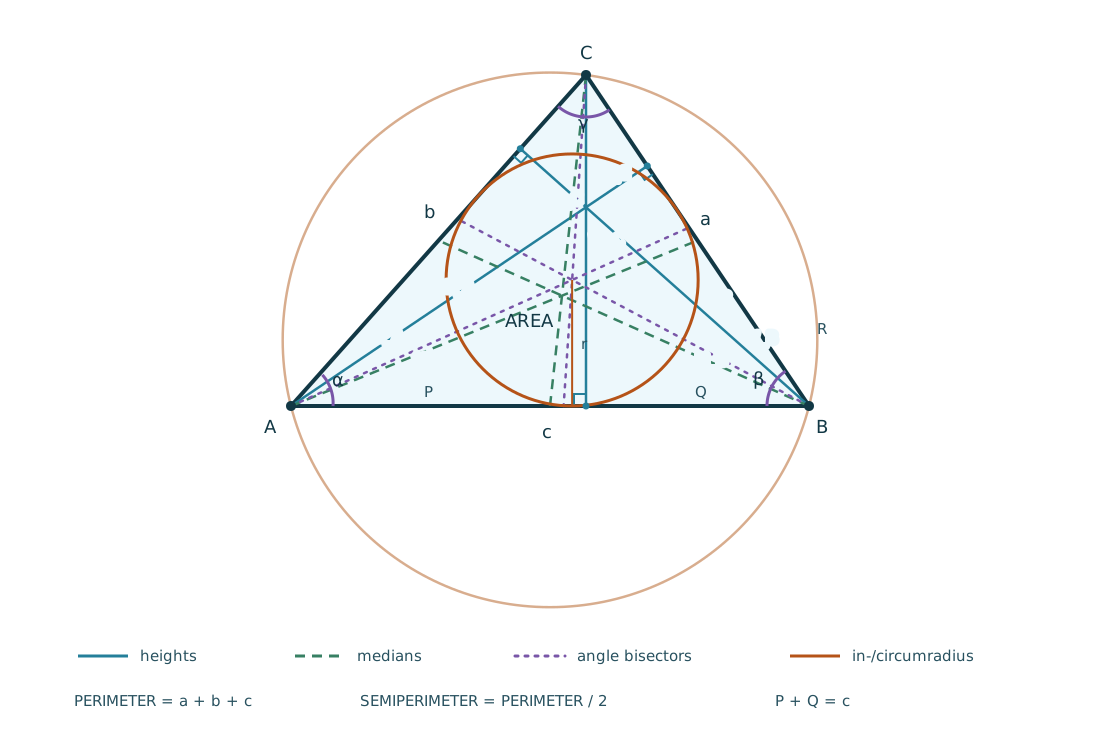
TRIANGLE(GAMMA=...; A=...; B=...) represents a triangle where A, B, and C are side lengths and GAMMA is the angle opposite C. All angles use the active trigonometric angle mode (DEG or RAD). The model also provides ALPHA, BETA; heights HA, HB, HC; medians MA, MB, MC; angle bisectors WA, WB, WC; AREA, PERIMETER, SEMIPERIMETER, INRADIUS, CIRCUMRADIUS, and the P/Q sections of side C. Descriptive aliases such as SIDE_A, ANGLE_GAMMA, HEIGHT_A, MEDIAN_A, and BISECTOR_A are accepted.
- with
:angle deg:TRIANGLE(GAMMA=90; A=3; B=4)->TRIANGLE(A=3; B=4; C=5; GAMMA=90°) - with
:angle rad:TRIANGLE(GAMMA=PI/2; A=3; B=4)->TRIANGLE(A=3; B=4; C=5; GAMMA=1.570796...) TRIANGLE(A=3; B=4; C=5).GAMMA->90TRIANGLE(GAMMA=90; A=3; B=4).C->5TRIANGLE(A=3; B=4; C=5).CX->3.2
The model calculates C from GAMMA, A, and B, calculates GAMMA from all three sides, and also uses GAMMA, C, and one other side when that has one unambiguous solution. Values that violate the triangle inequality or contradict each other produce an error. Inputs with two possible triangles ask for another independent field rather than silently selecting one. With too few independent values, known fields are shown and unknown fields are displayed as ?.
Use :edit TRIANGLE to open an empty triangle editor, or :edit TRIANGLE(A=3; B=4) to continue an existing triangle in the editor. The editor creates the same TRIANGLE(...) expression; it does not retain a partially entered triangle. TRIANGLE without fields is an error and points to :edit TRIANGLE.
AX, AY, BX, BY, CX, and CY are the vertex coordinates. AX and AY default to 0. For a complete triangle, B and C are derived using a horizontal base from A to B and C above that base. :draw TRIANGLE(...) adds its three vertices to the diagram. Use the arrow keys to move between fields, Tab / Shift+Tab to move forward / back, Enter to calculate, and Escape to cancel. In the browser, the focus follows the visible field grid; the terminal editor shows every field in a two-column form.
CIRLE
CIRLE(RADIUS=...) represents a circle. Enter any one positive value for RADIUS, DIAMETER, CIRCUMFERENCE, or AREA; the other three values are calculated consistently. Short aliases R, D, U, and A are accepted.
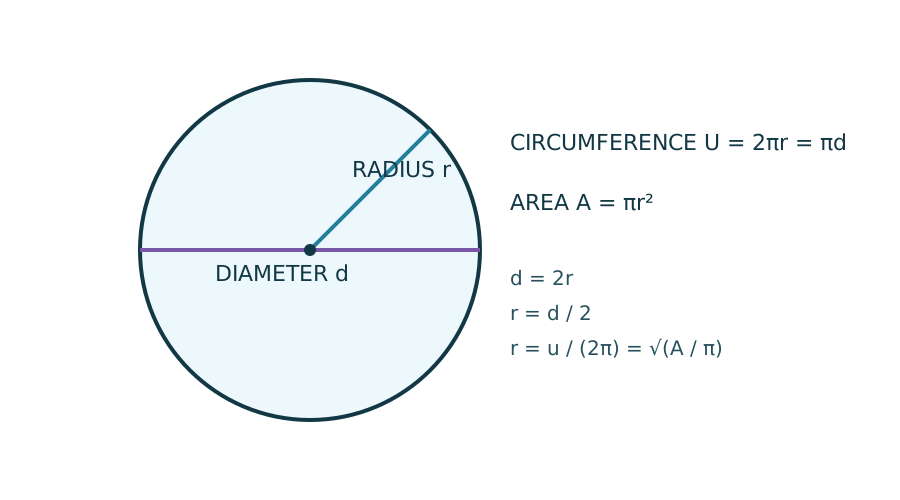
CIRLE(RADIUS=3).DIAMETER->6CIRLE(DIAMETER=10).CIRCUMFERENCE->31.41592653589793CIRLE(AREA=PI*9).RADIUS->3
Use :edit CIRLE to open the circle editor, or :edit CIRLE(AREA=PI*9) to continue with an existing value. The editor uses the same named-field syntax. CIRLE without a field points to :edit CIRLE.
FORMULA, collections, POINT, SERIES, and EVAL
Creates, stores, and evaluates a mathematical formula with one named parameter.
FORMULA('parameter'; 'expression')EVAL(formula; value)EVAL(formula)uses the stored variable whose name matches the formula parameterEVAL_LIST(formula; [values])creates a two-dimensional list of[x;y]pointsFILTER(series; formula)creates a SERIES by applying a formula to every measurementTRIM_LEFT(series; n)andTRIM_RIGHT(series; n)removenmeasurements from the left or right side of a SERIES
Examples:
F1 := FORMULA('X'; 'X^2+1')EVAL(F1; 3)->10X := 3followed byEVAL(F1)->102*EVAL(F1; 4)+1->35EVAL_LIST(F1; [-2;-1;0;1;2])->[[-2;5];[-1;2];[0;1];[1;2];[2;5]]:draw POINT(EVAL_LIST(F1; [-2;-1;0;1;2]))adds the evaluated points to the diagramFILTER(SERIES([1;2;3]); F1)->SERIES([2;5;10])TRIM_LEFT(SERIES([-75;-60;-73]); 1)->SERIES([-60; -73])TRIM_RIGHT(SERIES([-75;-60;-73]); 1)->SERIES([-75; -60])
Formula expressions may use their parameter, built-in constants such as PI, and deterministic mathematical functions such as SQRT, ROUND, FRAC, and GCD. They cannot change variables or diagrams. Use EVAL to obtain a numeric value before applying arithmetic to a formula.
POINT creates a finite two-dimensional point value for the drawing editor. It accepts either one coordinate pair or several bracketed pairs:
POINT(1; 2)POINT([0; 0]; [1; 1]; [2; 4])POINT([[0; 0]; [1; 1]])
LIST preserves the order and duplicate occurrences of its values. SET accepts numbers and strings, removes duplicates, and is used for comparisons. SERIES creates a connected numeric measurement series; its X coordinates are the measurement numbers starting at 1. A SERIES remains a diagram value, but the numeric functions (STAT_*, MIN, and MAX) accept it directly as a numeric sequence.
SERIES([-75; -60; -73])VALUES := [-75; -60; -73], thenSTAT_AVG(VALUES)and:draw SERIES(VALUES)COLORS := SET(['red'; 'blue'; 'red'])->SET(['red'; 'blue'])UNION([1; 'red']; SERIES([1; 2]))->SET([1; 'red'; 2])INTERSECT(SERIES([1; 2; 2]); [2; 3])->SET([2])DIFF([1; 'red'; 2]; SET(['red'; 3]))->SET([1; 2])SYMDIFF([1; 2]; SERIES([2; 3]))->SET([1; 3])
UNION, INTERSECT, DIFF, and SYMDIFF accept every combination of LIST, SET, and SERIES and always return a SET. Convert a sequence with LIST(sequence), SET(sequence), or SERIES(sequence); the SERIES conversion requires a non-empty sequence containing only numeric values.
For a short form, A + B is UNION(A; B) and A - B is DIFF(A; B) when both operands are LIST, SET, or SERIES values. Numeric addition and subtraction remain unchanged.
Use :edit LIST, :edit SET, or :edit SERIES to paste or edit one value per line. LIST keeps duplicate rows, SET removes duplicate values, and SERIES validates numeric measurements. In the terminal, a multiline paste is collected before the editor calculates. :edit SERIES([-75; -60; -73]) or :edit COLORS opens the existing values in the appropriate editor.
Charts
:draw and :chart
:draw draws two-dimensional POINT values, connected SERIES measurements, TRIANGLE vertices, and continuous FORMULA curves in the browser or terminal.
:draw POINT(x; y)or:draw POINT([x; y]; [x; y]; ...):draw SERIES([value; ...])connects numbered measurement points and shows the markers:draw FORMULA(...)draws a connected curve without point markers:draw TRIANGLE(...)draws the three triangle vertices:chart output textuses the built-in terminal diagram renderer;:chart output chafawrites a temporary SVG and renders it with Chafa. Switching tochafafails when Chafa is unavailable.:draw X^2creates a formula from an inline expression usingX- coordinates may contain arithmetic expressions
- consecutive drawing calls add a new, differently colored series to the existing diagram
- the color palette repeats after all available colors have been used
:chart bounds [minX; minY]; [maxX; maxY]sets a fixed visible area:chart autoremoves fixed bounds and fits the current data:chart scale equalkeeps one X unit and one Y unit equally long (default):chart scale stretchstretches the bounds exactly to the available diagram area:chart seriesmarkers ondraws a circle at everySERIESmeasurement (default):chart seriesmarkers offdrawsSERIESvalues as continuous lines only:chart clearremoves all series, bounds, and resets the color sequence:chart editlists the numbered chart elements and their colors:chart remove 2removes element 2; remaining element numbers remain stable:chart color 3 redchanges element 3 toblue,red,green,orange,purple,pink,slate, oryellow:chart editboundsopens an editor for the four bounds
Examples:
:draw POINT([0;0];[1;1];[2;4]):draw POINT(PI;SQRT(2))adds another series:draw SERIES([-75; -60; -73; -50]):draw F1adds a continuous curve for the stored formula:draw X^2draws a curve from an inline expression:chart bounds [1; -80]; [17; -30]fixes a data-focused range and redraws an existing diagram:chart autoreturns to automatic scaling:chart scale stretchfills the diagram area exactly with the selected bounds:chart seriesmarkers offhides the individual measurement circles:chart clearclears the diagram:chart edit, then:chart color 2 purplechanges one element without redrawing the others
Chart bounds remain active for subsequent drawing calls. They may exclude the origin, which is useful for measurement series; an axis is shown only when zero lies within the visible area. Points and curve sections outside the visible range are hidden. equal may expand one axis to preserve equal units; stretch keeps the requested bounds exact and scales the axes independently.
In the browser, pasting three or more newline-separated numeric values into an empty input creates SERIES([...]).
Formula curves are sampled at a higher horizontal resolution than the browser SVG viewport and rendered as connected paths. Undefined values split the curve into separate segments, preventing lines across common discontinuities. Without explicit chart bounds, :draw evaluates formula curves over an X range from -10 to 10; setting new bounds resamples existing formula curves across the complete visible X range.
Powers, logarithms, and general mathematics
ROOT(value; base)calculatesvalue^(1/base);valuemust be greater than zero andbasemay be any non-zero positive or negative number, including a fractionLOG10(value)calculates the base-10 logarithmLOG2(value)calculates the base-2 logarithmLOG(value; base)calculates a logarithm with an arbitrary positive base other than oneEXP(value)calculatese^valueLN(value)calculates the natural logarithmSIGNUM(value)returns-1,0, or1ABS(value)calculates the absolute value
Logarithm values must be greater than zero. These functions can also be used inside FORMULA expressions.
Examples:
ROOT(16;2)->4ROOT(8;FRAC(1;3))->512ROOT(16;-2)->0.25ROOT(16;FRAC(-1;2))->0.00390625LOG10(1000)->3LOG2(8)->3LOG(81;3)->4EXP(0)->1LN(EXP(2))->2SIGNUM(-12.5)->-1SIGNUM(0)->0ABS(-12.5)->12.5EVAL(FORMULA('X'; 'ROOT(X;2)+LOG2(X)');4)->4
Trigonometry, hyperbolic functions, and angle conversion
The circular trigonometric functions use the active angle mode. RAD is the default.
SIN(value),COS(value), andTAN(value)interpret their argument using the active modeASIN(value),ACOS(value), andATAN(value)return an angle using the active mode- CLI: use
:angle rador:angle deg - Browser: use the
Angleselector
Examples:
:angle deg, thenSIN(90)->1:angle deg, thenATAN(1)->45:angle rad, thenSIN(PI/2)->1:angle rad, thenATAN(1)-> approximately0.7853981633974483
The hyperbolic functions are independent of the angle mode:
SINH(value),COSH(value),TANH(value)ASINH(value),ACOSH(value),ATANH(value)
Explicit conversion functions also work independently of the active mode:
TO_RAD(180)->PIas a decimal valueTO_DEG(PI)->180
Time and date
TIME
Creates a TIME value.
TIME(hours; minutes; seconds)TIME(year; month; day; hours; minutes; seconds)- all parameters must be integers
Use :edit TIME to enter all date, clock, millisecond, microsecond, and nanosecond parts in one form. :edit TIME(...), :edit TIME_MS(...), :edit TIME_MICROS(...), and :edit TIME_NS(...) prefill the matching fields. Year, month, and day must be entered together; precision fields are added to the TIME value. :edit TIMENOW() starts with the current local date and time. :edit LAST and :edit _ reopen the most recent TIME value.
Examples:
TIME(6;5;5)->TIME(1;2;3) + TIME(5;3;2)TIME(4;0;59)->TIME(5;3;2) - TIME(1;2;3)TIME(2;4;6)->TIME(1;2;3) * 2TIME_MS(317500)->TIME(0;2;7) * 2.5TIME(0;1;4)->TIME(0;2;8) / 2TIME(5;0;0) / TIME(0;3;0)->100
TIMENOW
Returns the current local date and time as a TIME value.
TIMENOW()
Example:
TIMENOW()->TIME(2026;3;30; 14;30;5)
TIME_WEEKDAY
Returns the weekday of a dated TIME value using its complete localized name. The active :locale setting controls the language: de uses German names, us uses English names, and auto follows the runtime locale.
TIME_WEEKDAY(TIME(2026;7;23;19;18;0))->Donnerstagwith:locale deTIME_WEEKDAY(TIME(2026;7;23;19;18;0))->Thursdaywith:locale us
TIME_WEEKDAY requires a TIME value containing year, month, and day. A three-parameter TIME(hours; minutes; seconds) is a duration and has no weekday.
TIME_MS
Creates a TIME value from milliseconds.
TIME_MS(ms)msmust be an integer
Examples:
TIME_MS(3723004)->TIME_MS(3723004)TIME_MS(-1234)->TIME_MS(-1234)
TIME_NS
Creates a TIME value from nanoseconds.
TIME_NS(ns)nsmust be an integer
Examples:
TIME_NS(1234567890)->TIME_NS(1234567890)TIME_NS(-1234567890)->-TIME_NS(1234567890)TIME_NS(1234000000)->TIME_MS(1234)
TIME_MICROS
Creates a TIME value from microseconds.
TIME_MICROS(micros)microsmust be an integer
Examples:
TIME_MICROS(1234567)->TIME_MICROS(1234567)TIME_MICROS(-1234567)->-TIME_MICROS(1234567)TIME_MICROS(1234000)->TIME_MS(1234)
TODAY, TOHOUR, TOMIN, TOSEC, TOMS, TOMICROS, TO_NS
Convert a TIME value to a numeric total in the named unit.
TO_DAY(TIME(...))TO_HOUR(TIME(...))TO_MIN(TIME(...))TO_SEC(TIME(...))TO_MS(TIME(...))TO_MICROS(TIME(...))TO_NS(TIME(...))
Examples:
TO_SEC(TIME(1;30;0))->5400TO_HOUR(TIME(1;30;0))->1.5TO_MICROS(TIME_NS(1234567))->1234.567
For a TIME value containing a date, the result is the corresponding local Unix time in the selected unit, consistent with TO_TIME1970 and TO_DURATION.
TIMESEC, TIMEMIN, TIMEHOUR, TIMEDAY
Create TIME values from integer seconds, minutes, hours, or days. The resulting values support the same arithmetic operations as other TIME values.
TIME_SEC(secs)TIME_MIN(mins)TIME_HOUR(hours)TIME_DAY(days)
Examples:
TIME(1;4;3)->TIME(1;2;3) + TIME_MIN(2)TIME(1;1;59)->TIME(1;2;3) - TIME_SEC(4)TIME(48;0;0)->TIME_DAY(2)
TIME1970
Converts a unix epoch value to TIME(...). Input can be in seconds, milliseconds, microseconds, or nanoseconds.
TIME1970(epoch)epochmust be an integer
Examples:
TIME1970(1711805010)-> localTIME(...)valueTIME1970(1711805010000)-> same localTIME(...)valueTIME1970(1711805010000000)-> same localTIME(...)value
TO_TIME1970
Converts a TIME(...) value (with date fields) to unix epoch milliseconds.
TO_TIME1970(TIME(...))
Examples:
TO_TIME1970(TIME(2026;3;30;13;23;30))-> epoch millisecondsTO_TIME1970(TIME1970(1711805010000))->1711805010000
TO_DURATION
Formats a TIME value as a human-readable duration using long English unit names. TIME values containing a date are shown as the elapsed local time since the Unix epoch.
TO_DURATION(TIME(...))
Examples:
TO_DURATION(TIME(49;2;3))->2 days, 1 hour, 2 minutes, 3 secondsTO_DURATION(TIME_MS(1234))->1 second, 234 milliseconds
Symbolic conversion
TO_SYMBOLIC
Finds the simplest plausible symbolic representation of a finite numeric value. It compares fractions, rational multiples of PI, and square roots using the same floating-point tolerance and rejects unnecessarily complex representations.
TO_SYMBOLIC(value)
Examples:
TO_SYMBOLIC(3/4)->FRAC(3;4)TO_SYMBOLIC(0.3333333333333333)->FRAC(1;3)TO_SYMBOLIC(9.42477796076938)->PI * 3TO_SYMBOLIC(1.4142135623730951)->SQRT(2)TO_SYMBOLIC(LAST)-> symbolic representation of the previous result
Variables
Variables are case-insensitive and can be used directly in expressions.
- Assign a variable:
NAME := value - Remove a variable:
NAME := ()
When replacing or removing an existing variable, the browser and interactive terminal ask for confirmation first.
- List all variables:
:vars
Examples:
X := 4Y := _X+Y->8
Predefined Read-only Variables
These variables are built in and cannot be overwritten:
PI->3.14159265...KB->1024MB->1024 * 1024GB->1024 * 1024 * 1024TB->1024 * 1024 * 1024 * 1024
Examples:
3MB->31457284KB->4096
Implicit multiplication with variables is supported, for example:
3MB(2+1)MBX(1+2)
LAST
LAST contains the previous successful calculation result. _ is a read-only alias for LAST.
Example:
2+3->5LAST+1->6_+1->7
Persistence
Variables persist across sessions.
Binary And Hex Literals
You can enter binary and hexadecimal numbers directly in expressions.
- Binary: prefix with
0bor0B - Hexadecimal: prefix with
0xor0X
Examples:
0b10 + 0b01->30xA + 0x2->12
Output Modes
The calculator supports three output modes:
decimal(default)hexbinary
In hex mode, numeric results are shown with 0x prefix. In binary mode, numeric results are shown with 0b prefix.
Browser:
- Use the mode selector in the terminal meta area below the header.
- Use the angle selector to switch between
RADandDEG. - Use the keyboard selector in the terminal meta area to switch between numeric and alphanumeric keyboard input.
CLI:
- Use
:mode dec,:mode hex, or:mode bin. - Use
:angle rador:angle degto change the trigonometric angle mode. - Use
:locale auto,:locale us, or:locale deto change number separators. - In hex mode, prompt is
0x>. - In binary mode, prompt is
0b>.
Exit Codes (One-shot mode)
0successful evaluation1invalid input or evaluation error
This makes the CLI suitable for shell scripts and automation.
Troubleshooting
If node or npm is not recognized:
- Install Node.js from the official installer.
- Restart your terminal.
- Verify:
node -v
npm -v